
This assignment is to be done individually; you are not allowed to work on this assignment with anyone. See also the Academic Integrity page and the Assignment and Exam Policies
Develop a Rock, Paper, Scissors Game using JavaFX. Your application will include the following:
The diagram below shows you the relationships between the various classes and what members each class contains:
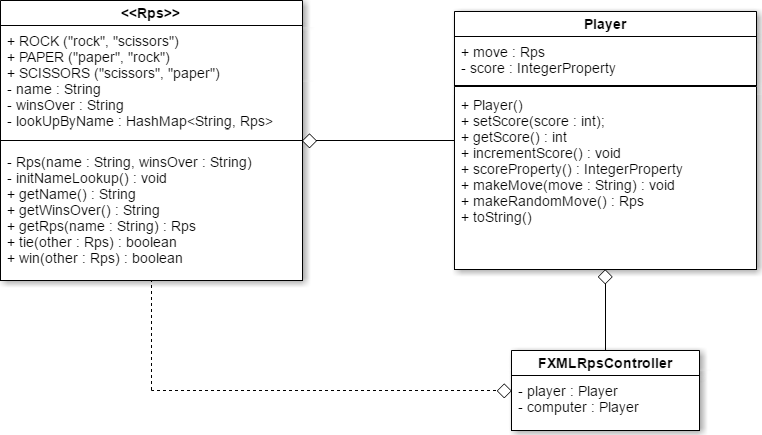
The Rps enum contains constants for the 3 Rock, Paper, Scissors moves, plus some string names for each. Also, each move is associated with a String value that represents the move that a current move will win over. For example, ROCK's winsOver String value is "scissors", because Rock will win over Scissors, and SCISSORS' winsOver String value is "paper", because Scissors wins over Paper. The enum also provides the programmer with the ability to look up a particular Rock, Paper, Scissors move by its string value. Finally, Rps contains methods that check to see if a certain move would tie or win over another move.
The Player class models a player in the game. A player has a current move and a current score. Player objects can make specifically assigned moves or can make a move at random. In the application, the Player class is used to model the human player and it will also model the computer player.
The FXMLRpsController class is the controller class that is paired with the View for this application.
Project Name: A3_LoginName (where LoginName is your own sheridan login name).
Package Name: loginname (your own login name, in lower-case letters). Do not use prog24178.loginname or anything else, just loginname.
The Rps class and the Player class must have proper and complete JAVADOC documentation. You don't have to generate the JavaDocs, just have the comments in your code. Additionally, all Java classes must contain appropriate internal documentation.
Failure to follow the above instructions could result in penalties. I'll also be testing your assignment by adding your library's .jar file to a new application and using JUnit (which relies on having your package and class names following the specifications above).
The Rps Enum is part of the data model for the Rock, Paper, Scissors game. The three constants, ROCK, PAPER, and SCISSORS each have a String name attribute that is used for display purposes (but also a few other things you'll discover as you complete the assignment), and a String winsOver attribute. The winsOver attribute contains the name of the move that will lose against a particular constant. For example, ROCK has a winsOver of "scissors" because rock wins over scissors.
Both name and winsOver have accessor methods and are set in the private constructor.
The getRps() method performs a reverse lookup: if you have the name of a move and need to get the enum constant for that move, you can use getRps(). For example, getRps("rock") will return Rps.ROCK.
The tie() method accepts another Rps enum constant returns true if it's equal to "this" Rps enum constant, then it's a tie game. For example:
if (Rps.ROCK.tie(player.makeRandomMove())) {
    System.out.println("It's a tie!");
}
The win() method is similar to the tie() method: it accepts another Rps enum contstant and returns true if "this" Rps constant wins over the parameter Rps constant. For example:
if (Rps.ROCK.win(player.makeRandomMove())) {
    System.out.println("Rock wins!");
}
The Player class models a player in the game.
The move member represents the current move made by a player. It is a public method so accessor/mutator methods are not necessary. The makeMove(String) accepts the name of a move as a String and sets he move member to the Rps enum corresponding to that string.
The score member is an IntegerProperty. The getScore() method returns the value of the score property. The setScore() method sets the value of the score property, as long as the score parameter is 0 or more, otherwise an exception is thrown. The incrementScore() method increases the score's property value by 1. The scoreProperty() method returns the score property, as is standard for property methods.
The Player's toString() method returns the name of the player's current move as a String.
The View should contain the following screen controls:
You will need images. Several collections of images you can choose from for this assignment. Keep your image sizes to something reasonable: length/width should be no smaller than 75 pixels and should be no larger than 300 pixels. Remember you can determine the dimensions of each image in your FXML code, you don't need to modify the actual files.
See the screen shot below. Your screen should follow the exact same layout.
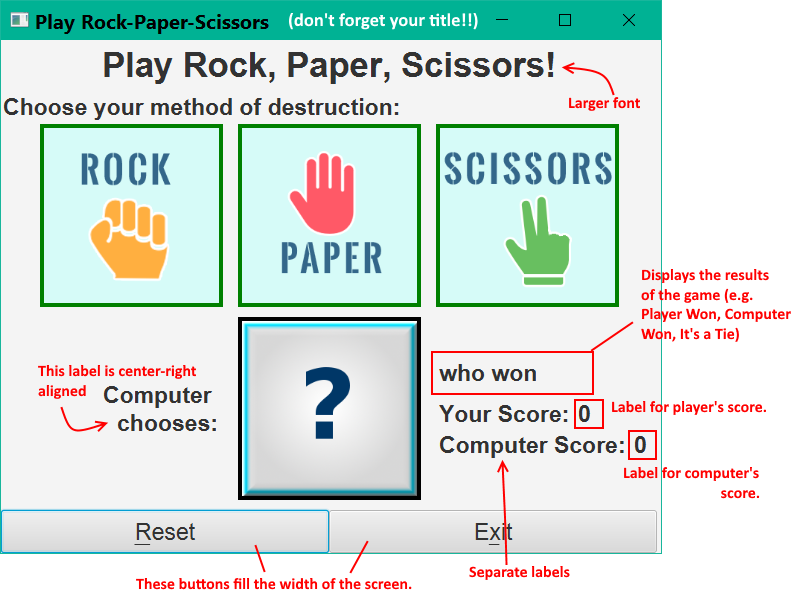
Your program should play Rock, Paper, Scissors between a human player and a computer player. If necessary, see how to play Rock, Paper, Scissors
To get your program functioning, your controller will need the following private data members:
The scoreProperty() of the human Player should be bound to the lblPlayerScore label and the scoreProperty() of the computer Player should be bound to the lblCompScore labels so that updates to the Player scores automatically update on the UI.
When the user clicks an image, the following things should happen:
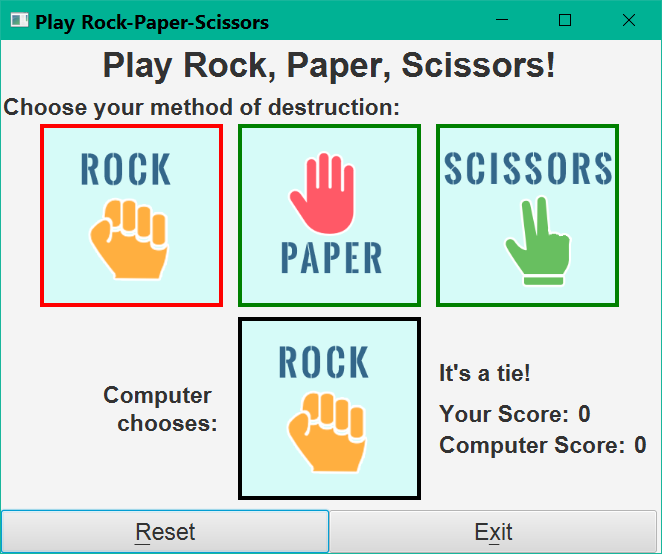
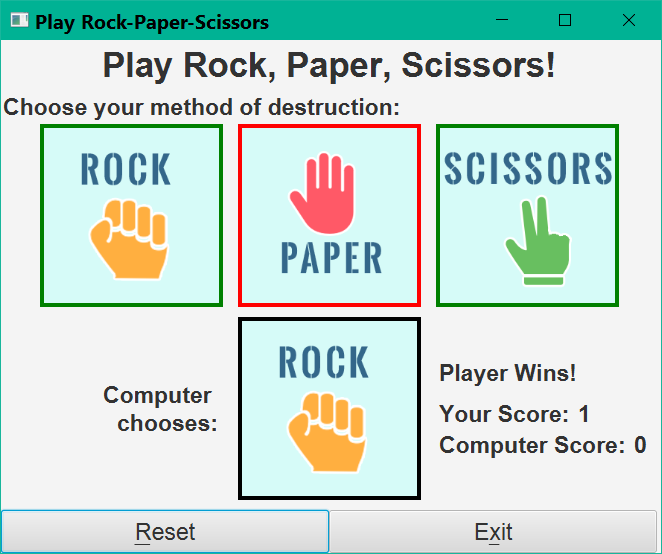
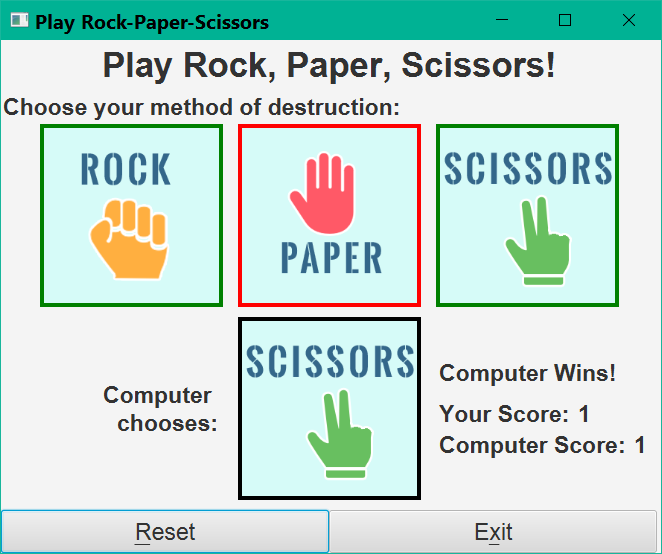
The reset button puts the screen back into its default state. This includes resetting borders, the computer's image, and the Player scores.
Exit the application using System.exit(0);
Changing the "border" of the images: There's no point in checking which border is "on" when you need to switch to a different image border. You can either set all three image borders back to the default or you can "remember" the previous image that was clicked and turn that image's border off (this would require an extra private data member in the controller).
How do you change the FlowPane's colour when all you have is a reference to the clicked image? Every control has a getParent() method that returns a reference to the container the control sits inside. For your images, getParent() returns a reference to the FlowPane they're sitting in.
Follow these instructions carefully!
Your submission must follow all the submission requirements outlined in the Submission Standards.
It is expected that all code will conform to the industry standards outlined in Java Standards for this Course.
You are to submit 2 files:
See Archiving a NetBeans Project if you're not sure how to do zip/rar a NetBeans project.
You must also copy and paste all of your source code from the Player, Rps, and Controller classes, plus your FXML and CSS into a plain text file (e.g. .TXT) or Word document (e.g. .DOC/.DOCX). You don't need to paste any other code into the text document.
Make sure you didn't forget any of your code! You must include:
You don't have to format any of this code - it's used by TurnItIn (the originality checker in SLATE, which is a piece of software that checks your submission for plagiarism against other submissions in the college, in other colleges, from the web, and various other sources).
Submit this document in addition to your source code zip/rar file. DO NOT add it inside your zip/rar file - it must be a separate file. This is used for TurnItIn (it won't accept java programs and won't examine the contents of zip/rar files).
Submit your assignment to the Assignment 3 drop box in SLATE. Upload the ZIP/RAR file, the .JAR file, and the TXT/DOC file separately.
Failure to follow any of the instructions above will result in penalties or a grade of 0.
It is expected that all code will conform to the industry standards outlined in Java Standards for this Course.
Your submission will be evaluated based on the following criteria:
| Assignment 3 | |
| Rps Enum | |
| Criteria | Mark |
|---|---|
| /10 | |
| Player Class | |
| Criteria | Mark |
| /10 | |
| FXML (View) | |
| Criteria | Mark |
| /15 | |
| Controller Class | |
| Criteria | Mark |
Image mouse events: Other events: | /15 |
| JavaDoc Comments (Player Class, Enum) | |
| /5 | |
| Penalties for Violating Industry Standards | |
| Criteria | Mark |
| -- | |
| Other Penalties | |
| Criteria | Mark |
|
| -- |
| Assignment 3 Total: | /55 |